
Virtual Pet Online
Virtual Pet Online
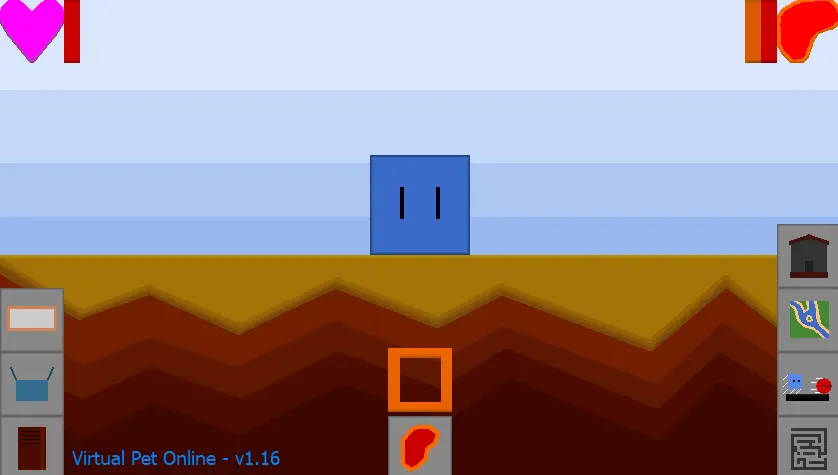
Virtual Pet Online is a game where you can take care of a Virtual Pet. [How to Play] Main Game: Upon starting, the Virtual Pet can either be a Red Circle, or Blue Square (from Virtual Pet - Circle and Virtual Pet - Square). On the top of the screen, there are 2 meters, which are the Happiness Meter, and Hunger Meter respectively. Over time, these will deplete. Petting the Virtual Pet will increase the Happiness Meter, which can be done by clicking on the Virtual Pet. Likewise, feeding the Virtual Pet will increase the Hunger Meter, which is done by clicking on the button in at the bottom while having at least 1 Meat in your inventory. If both meters are completely empty, the Virtual Pet will die. Clicking on a dead Virtual Pet will reset the game (and the save data). Clicking on the button in the bottom-left corner will open the Info Book, which contains information about the Virtual Pet Types. The game will autosave every 2 seconds. Maze Minigame: Clicking on the button that is in the bottom-right corner will take you to the Maze Minigame. Here, you have to guide the Virtual Pet through the maze without touching the walls. The Virtual Pet follows your Mouse Cursor. Touching the walls of the maze will cause the values of your Virtual Pet's meters to deplete {-2 Happiness, -1 Hunger}, while making it to the chest will increase the values of the meters {+3 Happiness, +3 Hunger} and give you 1 Meat. Racing Minigame: Above the Maze Minigame button, there is a button that takes you to the Racing Minigame. Here, you have to click (left-click, or right-click) the button in the bottom-right corner to make the Virtual Pet move. Your Virtual Pet's meters are changed depending on what place it finishes in. You'll also be given Meat depending on what place the Virtual Pet finishes in. Exploration Minigame: Above the Racing Minigame button, there is a button that takes you to the Exploration Minigame. Here, a random Virtual Pet will appear in a random place on the screen. If you click on it, you will befriend the Virtual Pet, and be given a choice as to what VPSS Box to put it in. There is a 1/100 chance of finding a Rare Virtual Pet. For every Virtual Pet you befriend, you have a better chance of finding a Rare Virtual Pet. Spooky Maze Minigame: Clicking on the button that is above the Exploration Minigame button will take you to the Spooky Maze Minigame. The objective is the same as in the Maze Minigame, except for the fact that you have to rescue 4 Virtual Pets to be able to access the chest at the end. There is a Dead Virtual Pet inside of the maze which you can rescue as well, although not required. If you make it to the chest after rescuing all 5 Virtual Pets, there is a surprise.
About BeeGames social
Playground and Play together are the BeeGames social layer — so you're never just playing alone.
What is a Playground?
Your Playground is your own personal game homepage. Pin the games you love, give it a name and a short bio, then make it public to share your personal arcade with anyone.
How do I use my Playground?
On any game page, tap “Playground” to pin that game. Head to My Playground to edit its name, bio and layout, then share your public link with friends.
What is Play together?
Play together lets you co-play the same game with friends in real time. Open a game room and everyone can play side by side while chatting in the room — like crowding around one screen, online.
How do I play with friends?
Tap “Play together” on a game page, pick a public room or a private one with a password, then share the room link with friends. You can also browse and join open rooms from the Lobby.