
脳年齢テスト瞬間記憶 part 4
脳年齢テスト瞬間記憶 part 4
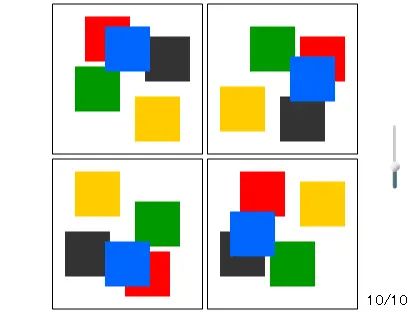
There are 4 pictures in the question. Only 1 picture has a different layout from others. Find a different one. *Click "START" and 4 pictures will appear on the screen. In these pictures, you will see one which has a different layout from others. brain age test 04 In this question above, please look at the picture in the bottom-right corner. The blue and the black figures' layouts are different from others. *After 10 questions, your brain age will be shown on the screen. 脳年齢テスト第四弾の図形識別です。 4つの図形から、1つだけ異なる配置の図形を選ぶ脳トレゲームです。 10問終了後、脳年齢が表示されます。 やり方 *スタートボタンを押すと4つの図形が表示されます。 そのなかの一つに、他とは異なる配置の図形があります。 脳トレ説明 ↑この問題の場合、右下の「青」と「黒」の配置が他の図形と異なっています。 説明2 右下の図形をクリックすると正解です。 *10問終了後に脳年齢が鑑定されます。
About BeeGames social
Playground and Play together are the BeeGames social layer — so you're never just playing alone.
What is a Playground?
Your Playground is your own personal game homepage. Pin the games you love, give it a name and a short bio, then make it public to share your personal arcade with anyone.
How do I use my Playground?
On any game page, tap “Playground” to pin that game. Head to My Playground to edit its name, bio and layout, then share your public link with friends.
What is Play together?
Play together lets you co-play the same game with friends in real time. Open a game room and everyone can play side by side while chatting in the room — like crowding around one screen, online.
How do I play with friends?
Tap “Play together” on a game page, pick a public room or a private one with a password, then share the room link with friends. You can also browse and join open rooms from the Lobby.