
Swingdoll Engine
Swingdoll Engine
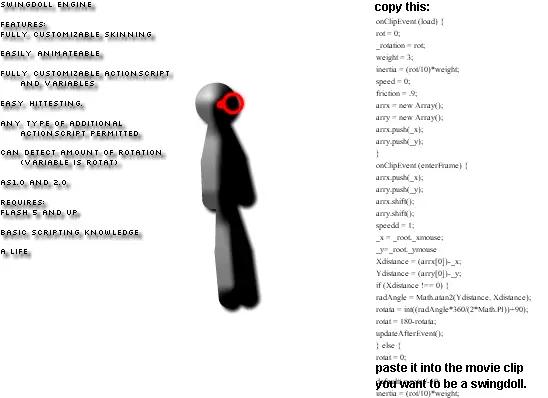
Swingdoll Engine. This is some form of ragdoll. It's not as cool or amazing as a real ragdoll, but with a normal ragdoll, when you move it back and forth, it just shakes around, but when you move THIS back and forth, it swings! Kinda buggy though. Mess around with the vars to get better swingdollness. And the best part is, its EXTREMELY customizable! You can animate it, do whatever you want. But the registry point is where it swings around. AND YES! THERE WILL BE UPDATES! hopefully one where you can swing around each joint seperately, but I gave the main code to perhaps it's possible if you want to edit it differently, or build it differently. First and foremost, it gets the x and y pos of the mouse, so perhaps you can edit that to a different point! :D THE SWINGDOLL WILL BECOME THE NEW RAGDOLL EVENTUALLY! MARK MY WORDS! Flash not working? Paste this code into a movie clip. No other code needed: onClipEvent (load) { rot = 0; _rotation = rot; weight = 3; inertia = (rot/10)*weight; speed = 0; friction = .9; arrx = new Array(); arry = new Array(); arrx.push(_x); arry.push(_y); } onClipEvent (enterFrame) { arrx.push(_x); arry.push(_y); arrx.shift(); arry.shift(); speedd = 1; _x = _root._xmouse; _y=_root._ymouse Xdistance = (arrx[0])-_x; Ydistance = (arry[0])-_y; if (Xdistance !== 0) { radAngle = Math.atan2(Ydistance, Xdistance); rotata = int((radAngle*360/(2*Math.PI))+90); rotat = 180-rotata; updateAfterEvent(); } else { rotat = 0; } defaultt = rotat/-10; inertia = (rot/10)*weight; speed -= inertia-defaultt; speed *= friction; rot += speed; _rotation = rot; } and feel free to edit this code however you want. Supposedly make it attach no another part of the swingdoll, and create separate joints. This is just a basic engine, so you can do whatever you want. Let's see what you can do! :)
About BeeGames social
Playground and Play together are the BeeGames social layer — so you're never just playing alone.
What is a Playground?
Your Playground is your own personal game homepage. Pin the games you love, give it a name and a short bio, then make it public to share your personal arcade with anyone.
How do I use my Playground?
On any game page, tap “Playground” to pin that game. Head to My Playground to edit its name, bio and layout, then share your public link with friends.
What is Play together?
Play together lets you co-play the same game with friends in real time. Open a game room and everyone can play side by side while chatting in the room — like crowding around one screen, online.
How do I play with friends?
Tap “Play together” on a game page, pick a public room or a private one with a password, then share the room link with friends. You can also browse and join open rooms from the Lobby.