
Musical experiment
Musical experiment
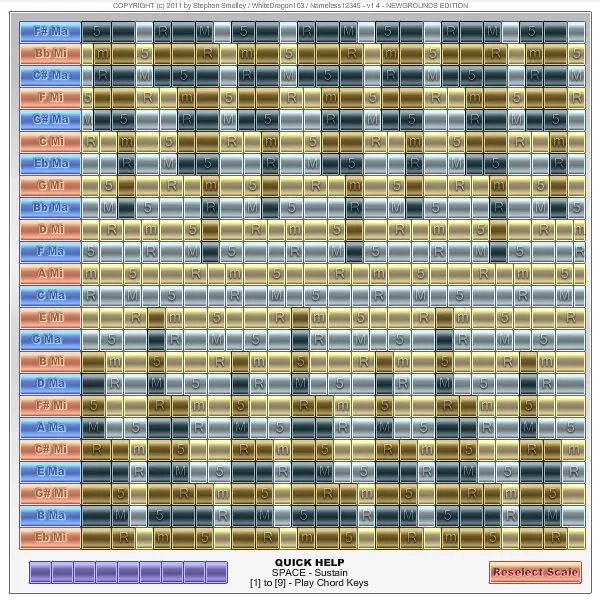
This is an experimental layout based on scales and a variation of the circle of fifths, called the circle of thirds. HOW TO PLAY: ------------------------- ----------------- READ THE HELP PAGE IN THE FLASH. Click and drag your mouse across a row of keys. The major and minors scales of different keys are laid out horizontally. To play a melody, pick a row of keys and play a melody from the keys in that row. When you want to change the scale your playing with, pick a different row. Play chords using the keyboard numbers [1] - [9]. Press these keys to play triads. To play block chords, press multiple keys at the same time. To instead arpeggiate the chord, press them one after the other. The chord that is played depends on what scale you are using. If you are using a Major C scale, you will play a Major C triad. If you are using a Minor E scale, you will play a Minor E triad. The key and major/minor notation for each scale is labelled on the left. The chord will be inverted so the keys of said chord follow the last scale note you clicked, meaning as you play higher, the chords will also be higher. IMPORTANT NOTE: Due to limitations of Flash, sometimes it cannot detect multiple or rapid inputs from the keyboard. Sometimes if you press a key, a sound will not be produced. Pressing [SPACE] acts like a sustain pedal on the piano. Holding this down will cause notes to remain sounding even after releasing the key. Releasing the sustain pedal will, however, release the notes that are not being held down. THE THEORY BEHIND THE LAYOUT: ------------------------- ------------------ Along the left side you will see a stack of bars labelled C Major, E Minor, etc. This vertical axis follows the circle of thirds. In the circle of thirds, triad chords (such as C Major) will sound more harmonious when paired with other nearby chords on this sequence. The further apart two chords are, the less harmonious they sound together. For example, C Major and E Minor sound harmonious together, and they are close together in the circle of thirds. C Major and D Major are further apart on the wheel, but they still sound harmonious together, though perhaps not as much. C Major sounds least harmonious with F# Major, and they are on opposite sides of the wheel. The wheel is drawn vertically for ease of playing and programmability, but it is conceptually circular. When you pick a chord to play in, you can play it's corresponding scale. Each scale can be played in any key, and most scales have a major and a minor version. So long as you keep your mouse within one row of keys, it will play on the correct scale and you will not press any sour notes. Playing chords with a melody will cause the two to complement one another. The melody helps connect chords together, and the chords give the melody more emotional depth.
About BeeGames social
Playground and Play together are the BeeGames social layer — so you're never just playing alone.
What is a Playground?
Your Playground is your own personal game homepage. Pin the games you love, give it a name and a short bio, then make it public to share your personal arcade with anyone.
How do I use my Playground?
On any game page, tap “Playground” to pin that game. Head to My Playground to edit its name, bio and layout, then share your public link with friends.
What is Play together?
Play together lets you co-play the same game with friends in real time. Open a game room and everyone can play side by side while chatting in the room — like crowding around one screen, online.
How do I play with friends?
Tap “Play together” on a game page, pick a public room or a private one with a password, then share the room link with friends. You can also browse and join open rooms from the Lobby.