
4.4 Developing Geometry Understandings with Tangrams
4.4 Developing Geometry Understandings with Tangrams
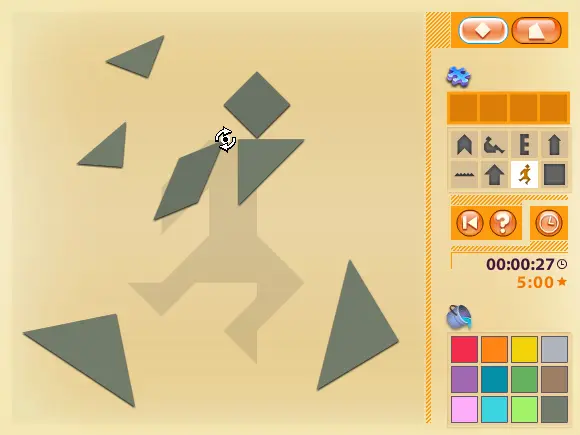
Grade: PreK to 2nd In this two-part e-example, students choose from eight pre-made outlines and use either seven or fourteen pieces to create images and build basic geometric understandings. The options include the ability to: color, rotate, show hints, time progress, and create your own outlines. Instructions Choose between 7 and 14 pieces to fill the outline. To flip a piece, click on it, and press the flip button: To rotate a piece, hover above a vertex until the rotate indicator appears. Click, hold, and rotate the piece to the desired orientation. To receive help, click on the question mark; outlines will briefly appear to guide you. You can display or hide the timer by clicking on the clock. To reset the work space, click on Reset. For finishing touches, choose a color from the palate and click on a piece. To create a custom outline, move the pieces to the desired positions. Then, choose an empty box, and click "Save." To use the custom outline, choose the puzzle piece, and the tangrams will reset themselves. Exploration Is it possible to complete all these tasks? Try these tangram challenges with the virtual tangrams: Make a square using only one tangram piece. Make a square using two tangram pieces. Make a square using three tangram pieces. Make a square using four tangram pieces. Make a square using five tangram pieces. Make a square using six tangram pieces. Make a square using all seven tangram pieces. Which of these figures can you make using all seven tangram pieces? A trapezoid A rectangle that is not a square A parallelogram that is not a square A triangle Objectives and Standards NCTM Standards and Expectations Geometry / Measurement Understand that by similarity, side ratios in right triangles are properties of the angles in the triangle, leading to definitions of trigonometric ratios for acute angles. Pre-K - 2 Geometry
About BeeGames social
Playground and Play together are the BeeGames social layer — so you're never just playing alone.
What is a Playground?
Your Playground is your own personal game homepage. Pin the games you love, give it a name and a short bio, then make it public to share your personal arcade with anyone.
How do I use my Playground?
On any game page, tap “Playground” to pin that game. Head to My Playground to edit its name, bio and layout, then share your public link with friends.
What is Play together?
Play together lets you co-play the same game with friends in real time. Open a game room and everyone can play side by side while chatting in the room — like crowding around one screen, online.
How do I play with friends?
Tap “Play together” on a game page, pick a public room or a private one with a password, then share the room link with friends. You can also browse and join open rooms from the Lobby.