
rTexPacker
rTexPacker
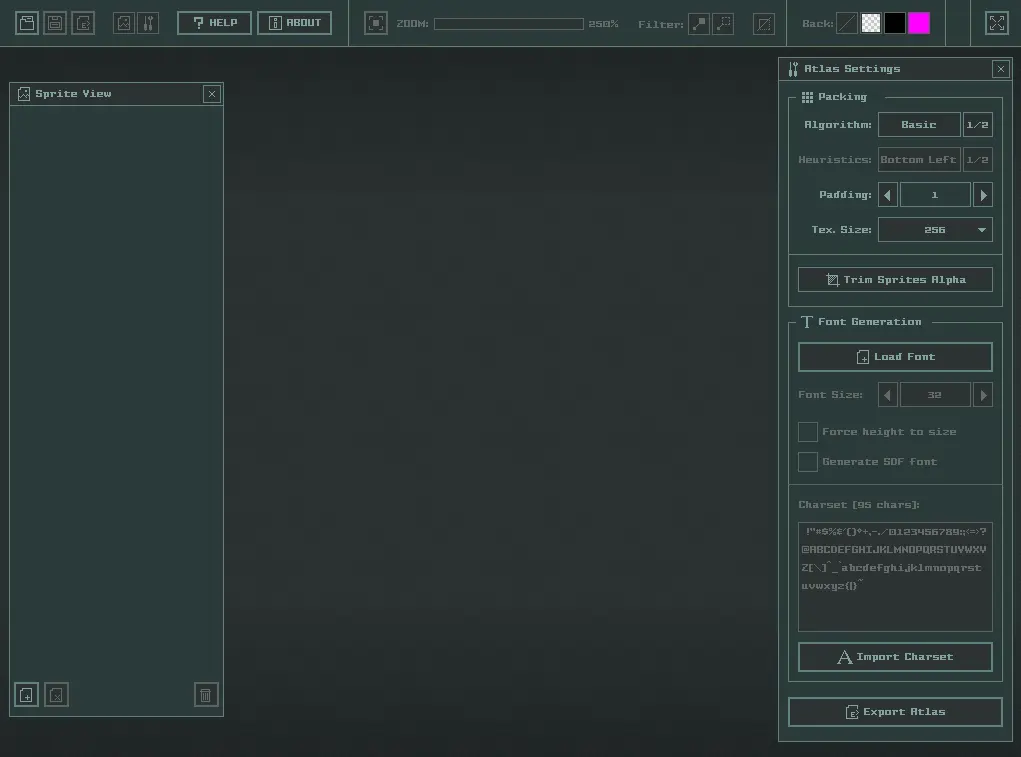
rTexPacker v1.1 A simple and easy-to-use textures packer and font atlas generator. Package multiple sprites into a texture atlas to improve drawing performance. Multiple packing options available and also font atlas generation supported. Packed atlas can be exported to multiple data formats. ENJOYING this TOOL??? CONSIDER a DONATION HERE or CONTRIBUTING on raylib PATREON or GITHUB SPONSORS to ALLOW the AUTHOR KEEP CREATING AMAZING FREE TOOLS. rTexPacker comes in two flavours: ZERO (free version) and ONE (low-cost version). rTexPacker ZERO features Load multiple image fileformats: PNG, BMP, TGA, JPG. Load/Save a portable self-contained .rtp file, containing all sprites. Various packing algorythms and heuristics, including sprites alpha trim. Multiple font atlas generation option, including SDF fonts generation. Multiple atlas visualization options: Zoom, Pan, Background, Helpers... Export atlas image as PNG, DDS or RAW, with configurable pixel format. Export atlas descriptor as text (.rtpa), xml or json. Maximum atlas size limited to 2048x2048 pixels. Completely portable (single file) rTexPacker ONE features Powerful command line for batch sprites packing. Maximum atlas size up to 8192x8192 pixels. rTexPacker Usage Open the tool, drag & drop your sprites/fonts and setup atlas packing options. Generated atlas can be exported as atlas-descriptor text file (.rtpa, xml, json) plus atlas image file (.png). rTexPacker ONE also allows exporting atlas image as DDS or RAW files. rTexPacker ONE comes with a powerful command line for batch atlas generation, enabling sprites packing with a very simple and comprehensive command line. To view all available operations just run on command line: > rtexpacker.exe --help rTexPacker Custom Do you like this tool? Do you need any specific feature to be added? Maybe a custom export format? Maybe a custom gui theme? Or maybe a version for Linux, OSX, Android, Raspberry Pi or HTML5? Just get in touch! rTexPacker Issues & Feedback You can report tool issues and feedback here: https://github.com/raylibtech/rtools NOTE: This release is an ALPHA version, it's completely functional but some features and details are still missing, specifically the custom charset edition on textbox. Any feedback is very welcome! rTexPacker License rTexPacker is closed source software but it's based on open-source technologies: raylib and raygui. rTexPacker ZERO is free and rTexPacker ONE is low-cost, with the addition of some useful features. In any case, consider it as a small donation to help the author keep working on software for games development.
About BeeGames social
Playground and Play together are the BeeGames social layer — so you're never just playing alone.
What is a Playground?
Your Playground is your own personal game homepage. Pin the games you love, give it a name and a short bio, then make it public to share your personal arcade with anyone.
How do I use my Playground?
On any game page, tap “Playground” to pin that game. Head to My Playground to edit its name, bio and layout, then share your public link with friends.
What is Play together?
Play together lets you co-play the same game with friends in real time. Open a game room and everyone can play side by side while chatting in the room — like crowding around one screen, online.
How do I play with friends?
Tap “Play together” on a game page, pick a public room or a private one with a password, then share the room link with friends. You can also browse and join open rooms from the Lobby.