
Rubik's Ufo
Rubik's Ufo
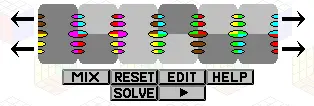
The Rubik's Ufo puzzle is in the shape of a flying saucer. It consists of two disks, each with six segments. There are two types of moves - the disks can turn with respect to each other (by multiples of 60 degrees), or any half can be given a 180 degree twist so that three segments of the top disk are swapped with three segments of the bottom. The top disk is light grey, the other disk dark grey. The segments have colours along their sides so that adjacent segments should have matching colours. The Ufo is based on a simpler early puzzle by Rubik, called Rubik's Cheese. That puzzle has only one circular layer of six pieces, so it is like a Ufo that is restricted to do only twists and not disk turns. The Rubik's Cheese is discussed further on the page about a related puzzle called Kep Korong. The second picture above shows a puzzle that is based on a two-layer Square-1, but with only corner pieces in each layer so that it has a six-pointed star shape. The pieces come in three different colours of plastic, four of each colour. In the solved position, each third of the puzzle has a single colour. If your browser supports JavaScript, then you can play Rubik's Ufo by clicking the link below:
About BeeGames social
Playground and Play together are the BeeGames social layer — so you're never just playing alone.
What is a Playground?
Your Playground is your own personal game homepage. Pin the games you love, give it a name and a short bio, then make it public to share your personal arcade with anyone.
How do I use my Playground?
On any game page, tap “Playground” to pin that game. Head to My Playground to edit its name, bio and layout, then share your public link with friends.
What is Play together?
Play together lets you co-play the same game with friends in real time. Open a game room and everyone can play side by side while chatting in the room — like crowding around one screen, online.
How do I play with friends?
Tap “Play together” on a game page, pick a public room or a private one with a password, then share the room link with friends. You can also browse and join open rooms from the Lobby.