
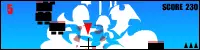
SUPER仕込みバナー
SUPER仕込みバナー
マウスで操作します。 カーソルを、バナー左側のマークにあわせてクリックすると、ホームページにジャンプします。 バナー右側のロゴをクリックすると、ゲームが始まります。 ゲーム中、自機はマウスに追従して動きます。 ボタンを押している間、パワーが溜まり、ボタンを離すとジャンプします。 自機の先端で、敵を突き刺せば破壊できます。 空中の敵を殺すたびに、左上の数字が1つ減ります。数字が0になれば、ステージクリアです。 Operate with the mouse. Click the cursor to match the mark on the left side of the banner, and you will jump to the homepage. Click on the logo on the right side of the banner, the game will start. During the game, your character will follow the mouse and move. While you are holding down the mouse button it charges the jumping power, and jumps when you release the button. You can destroy the enemies by piercing at the tip of your character. Every time you kill an enemy in the air, the number in the upper left is decremented by one. When the number becomes 0, you clear a stage.
About BeeGames social
Playground and Play together are the BeeGames social layer — so you're never just playing alone.
What is a Playground?
Your Playground is your own personal game homepage. Pin the games you love, give it a name and a short bio, then make it public to share your personal arcade with anyone.
How do I use my Playground?
On any game page, tap “Playground” to pin that game. Head to My Playground to edit its name, bio and layout, then share your public link with friends.
What is Play together?
Play together lets you co-play the same game with friends in real time. Open a game room and everyone can play side by side while chatting in the room — like crowding around one screen, online.
How do I play with friends?
Tap “Play together” on a game page, pick a public room or a private one with a password, then share the room link with friends. You can also browse and join open rooms from the Lobby.