
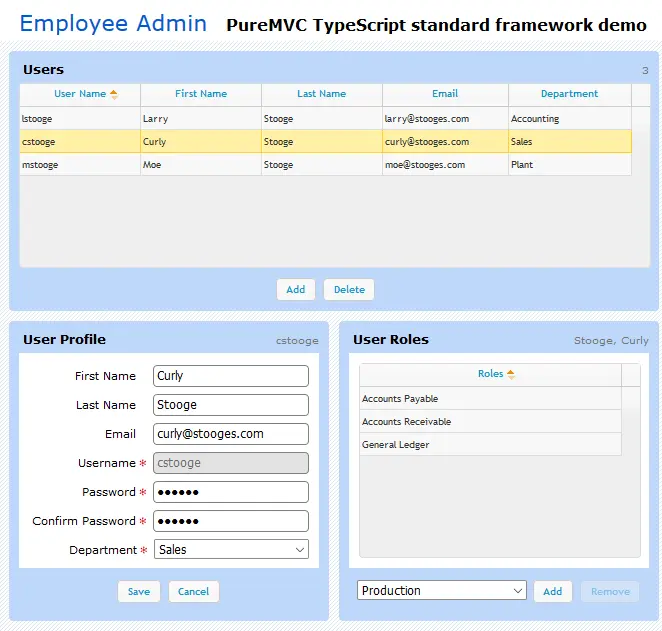
PureMVC TypeScript Demo: Employee Admin
PureMVC TypeScript Demo: Employee Admin
This demo illustrates techniques for performing routine client-side maintenance operations in a PureMVC-based TypeScript application. PureMVC framework and Employee Admin demo library files are loaded using Require.js. UI components are displayed using jQuery, jQuery UI and jQgrid. The demo is compiled as an AMD module using an Ant script that palliate TypeScript compiler issues building a single module using multiple TypeScript files. TypeScript will probably evolve on this point in a near future. The demo will be tested and updated on each new TypeScript compiler release. If it's not sufficiently up to date for you, please open an issue on Github or just send a pull request by your own, this will be more than welcome.
About BeeGames social
Playground and Play together are the BeeGames social layer — so you're never just playing alone.
What is a Playground?
Your Playground is your own personal game homepage. Pin the games you love, give it a name and a short bio, then make it public to share your personal arcade with anyone.
How do I use my Playground?
On any game page, tap “Playground” to pin that game. Head to My Playground to edit its name, bio and layout, then share your public link with friends.
What is Play together?
Play together lets you co-play the same game with friends in real time. Open a game room and everyone can play side by side while chatting in the room — like crowding around one screen, online.
How do I play with friends?
Tap “Play together” on a game page, pick a public room or a private one with a password, then share the room link with friends. You can also browse and join open rooms from the Lobby.