
Ourobos
Ourobos
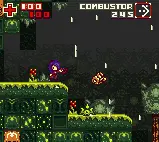
Greenlight the full game!: Greenlight previous LDjam game: http://steamcommunity.com/sharedfiles/filedetails/?id=759822137 (You can change the controls by pressing 1,2 or 3 at the title screen. This will change the keys to A-S/Shoot-Jump or the WASD and KL) (You can turn down the sound or mute by using the +/- keys) (If the game seems to freeze, it's because it's saving and loading) (You must set the storage to MAXIMUM!) I've done it. This is a "pocket Metroid" made in under 72 hours. From scratch. And seriously, this was the closest, hardest, most hectic game I've ever made! First off, I suggest you should download the standalone file for windows if you want to play the 60fps, extra fancy looking version. The flash one has to be toned down in order for it to run and it still might run slower than intended. (I don't have time to sadly streamline stuff >.<) WINDOWS VERSION: https://www.dropbox.com/s/xn0xhxiacz5kh3r/LDj-34-Ourobos.zip?dl=1 I've spent the past 72 hours making this from scratch, the whole game. So expect bugs and problems 'ere and there but for the most part it should be playable. It's been a real challenge and I've had hardly any sleep! So have a go, hope ye like! :) (But if you're having problems with lag or whatever, please download the Windows version!) (You can turn down the sound or mute by using the +/- keys) CONTROLS: Arrows = Move X = Jump Z = Shoot Enter = Main Screen/Pause (You can change the controls by pressing 1,2 or 3 at the title screen. This will change the keys to A-S/Shoot-Jump or the WASD and KL)
About BeeGames social
Playground and Play together are the BeeGames social layer — so you're never just playing alone.
What is a Playground?
Your Playground is your own personal game homepage. Pin the games you love, give it a name and a short bio, then make it public to share your personal arcade with anyone.
How do I use my Playground?
On any game page, tap “Playground” to pin that game. Head to My Playground to edit its name, bio and layout, then share your public link with friends.
What is Play together?
Play together lets you co-play the same game with friends in real time. Open a game room and everyone can play side by side while chatting in the room — like crowding around one screen, online.
How do I play with friends?
Tap “Play together” on a game page, pick a public room or a private one with a password, then share the room link with friends. You can also browse and join open rooms from the Lobby.