
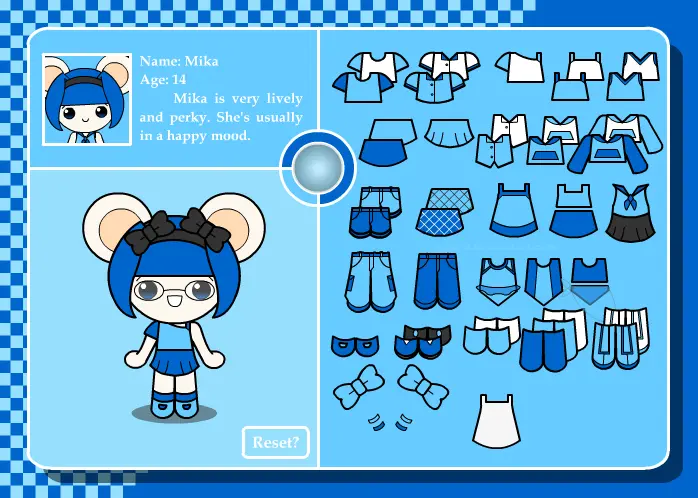
Niho, Mika and Ming doll+
Niho, Mika and Ming doll+
Yep, all three critter girls are featured in this doll! =) Alrighty, this is my first doll drawn and encoded entirely in flash, as opposed to my previous works which import compiled pixel art into flash format. I've already created a Niho doll before so now I created a doll with multiple bases, and you can now switch to whichever critter appeals to you the most! Also, since I was making a multiple-character doll, I opted to include someone else here... Her character design was already finalized since I've been away from dA, and this would be her first-ever appearance! You need to find her first though.. ============================================= :bulletgreen: Notes/Features :bulletgreen: - click the "glowing orb" to open the character select menu - click on Niho & Mika's headbands to change the color - click on the mouth to change it to a grin/smile - the reset button's pretty self-explanatory =p - snap-on clothing - multiple bases w/ color schemes - animated portraits - short bios - bonus content, speaking of which... HIDDEN CHARACTER HINT: You'll notice there's a "?" square in the character select menu, and it'll say you need 4 items. You cannot find all 4 with just one character because Niho, Mika and Ming-ming's wardrobe each hides at least one item. In other words, switch between characters and then hunt for those hidden items! Good luck!! ============================================= :bulletred:Edit (Jan 2014) - Since she has gotten a few pics already over the years, the 4th character is not exactly a secret anymore. For those who are really stuck unlocking her, just check the hint below:
About BeeGames social
Playground and Play together are the BeeGames social layer — so you're never just playing alone.
What is a Playground?
Your Playground is your own personal game homepage. Pin the games you love, give it a name and a short bio, then make it public to share your personal arcade with anyone.
How do I use my Playground?
On any game page, tap “Playground” to pin that game. Head to My Playground to edit its name, bio and layout, then share your public link with friends.
What is Play together?
Play together lets you co-play the same game with friends in real time. Open a game room and everyone can play side by side while chatting in the room — like crowding around one screen, online.
How do I play with friends?
Tap “Play together” on a game page, pick a public room or a private one with a password, then share the room link with friends. You can also browse and join open rooms from the Lobby.