
Touhou Exchanger
Touhou Exchanger
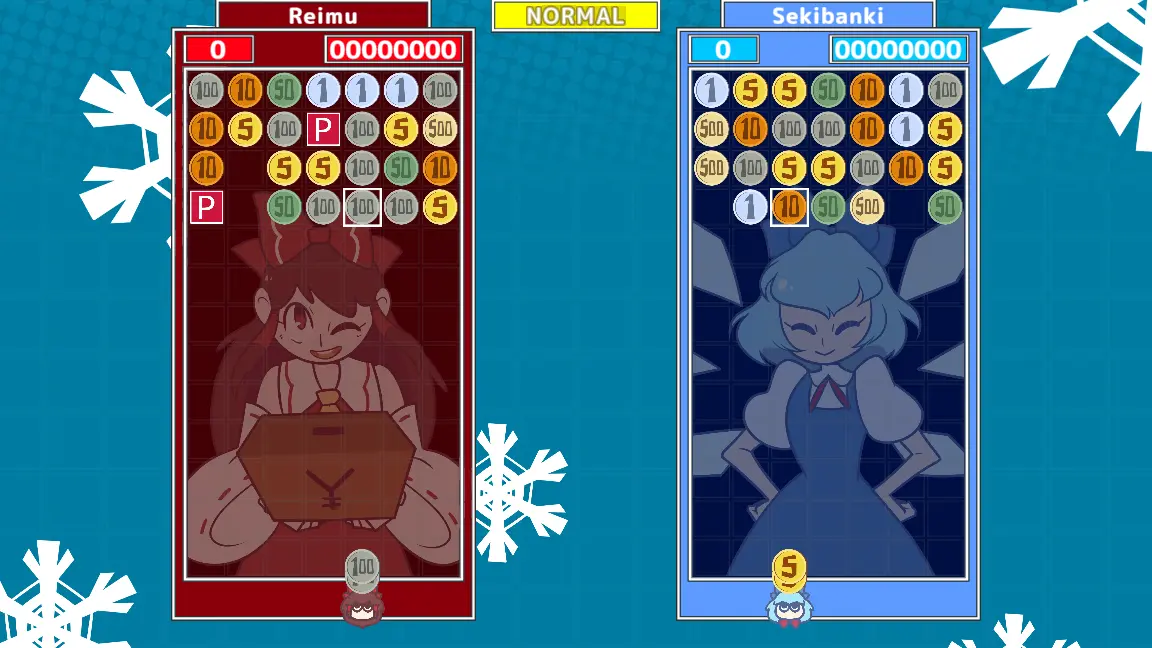
Produced for 9-Jam and Cirno Day, this is a Touhou remake of Money Puzzle/Idol Exchangers, a 1997 arcade game by Face. Updated to v4 (Teamplay) Features 2-4 Player online versus mode, now with teams Endless Arcade mode in four difficulties 4 1/2 voiced and varied characters A Tutorial Controls Z/X to pull / push a stack of coins to your character Left/Right Arrow keys to position your character under your desired column Double tap down to add additional rows to your side, to avoid running out of steam. Gameplay Combine even-numbered coins in groups of five, and odd numbered coins in groups of two, exchanging them for higher value coins, all without your board spilling over! By forming combos, you can send rows to the opponents side, either by cascading into combos or by quickly making matches during the combo animation. Matching blue powerups upgrade the coin type above them to the next highest coin type, red powerups erase all the coins of the matching type. Strategy Combined coins appear in the lowest, rightmost spot in the combo. Overmatching additional coins in a combo doesn't increase the produced coin, shortchange your opponents to keep your board clear. You can hold any number of the same coin at once, so pulling every coin you can of that type before throwing it back helps you group unfinished combos. Matching odd coins is quite fast since it only requires two, try to open chains with even coins then extend them by quickly pairing odd coins. Matching powerups horizontally doubles the effectiveness since you they will effect both kinds of coins. In general, try to activate powerups on even numbered coins. Rows you pull are easier to solve than rows your opponent sends to you, and rows your opponent sends never contain powerups. Pull a bunch of rows before using your red powerup for best results.
About BeeGames social
Playground and Play together are the BeeGames social layer — so you're never just playing alone.
What is a Playground?
Your Playground is your own personal game homepage. Pin the games you love, give it a name and a short bio, then make it public to share your personal arcade with anyone.
How do I use my Playground?
On any game page, tap “Playground” to pin that game. Head to My Playground to edit its name, bio and layout, then share your public link with friends.
What is Play together?
Play together lets you co-play the same game with friends in real time. Open a game room and everyone can play side by side while chatting in the room — like crowding around one screen, online.
How do I play with friends?
Tap “Play together” on a game page, pick a public room or a private one with a password, then share the room link with friends. You can also browse and join open rooms from the Lobby.