
rGuiLayout
rGuiLayout
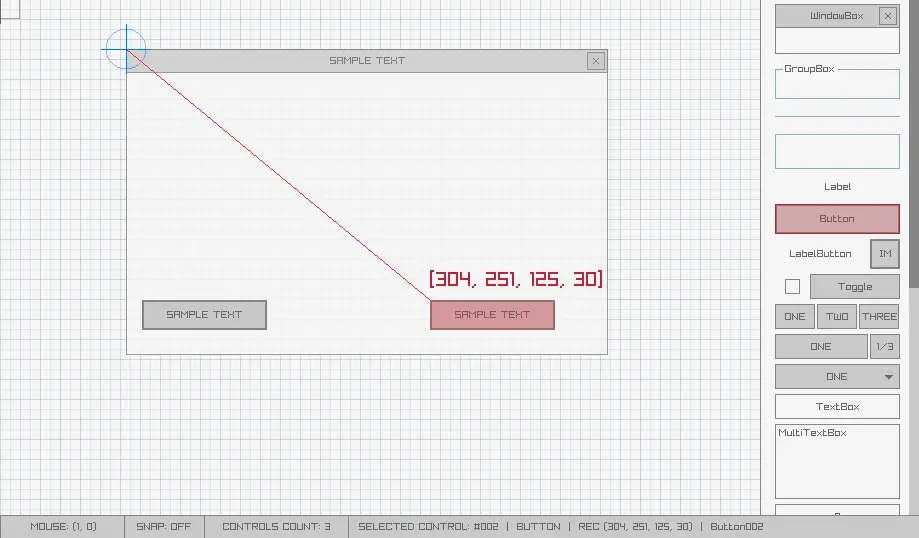
rGuiLayout v2.2 A simple and easy-to-use raygui layouts editor. Useful for fast tools development. The perfect companion for rGuiStyler. ENJOYING this TOOL??? CONSIDER a DONATION HERE or CONTRIBUTING on raylib PATREON or GITHUB SPONSORS program to ALLOW the AUTHOR KEEP CREATING AMAZING FREE TOOLS. rGuiLayout comes in two flavours: ZERO (free version) and ONE (low-cost version). rGuiLayout ZERO features +25 controls available to define your imgui layout Place controls visually and move/scale them freely Controls text edition and name edition (for exported variables) Snap to grid mode for maximum precission Anchors mode support to link your controls Save/Load your layout as .rgl files Generate ready-to-use C code (limited to 12 controls) Tracemap image loading (.png) for reference 8 sample layout provided for reference Completely portable (single file) rGuiLayout ONE features Powerful command line for batch conversion of rgl layouts Import .rgs files to customize visual style (drag&drop) Generate ready-to-use C code for layout (no controls limit) Choose between different code generation templates rGuiLayout Usage The tool is pretty intuitive to use, it mostly works with mouse and several key shortcuts that can be seen just pressing F1 key. Use mouse wheel to navigate available controls or select them on right controls panel, place them and scale if required. rGuiLayout allows loading .rgl layout files with drag&drop. rGuiLayout ONE also allows loading .rgs style files created with rGuiStyler and export created layouts as C code with no controls limit. Press LCTRL+ENTER to show code generation window, you can configure multiple export options to generate the code. To compile generated code, you need raygui v2.6 library (single-file header-only) and raylib v2.6-dev library. rGuiLayout ONE comes with a powerful command line for layout to code generation. To view all available operation just run on command line: > rguilayout.exe --help rGuiLayout Custom Do you like this tool? Do you need any specific feature to be added? Maybe a custom export format? Maybe a custom gui theme? Or maybe a version for Linux, OSX, Android, Raspberry Pi or HTML5? Just get in touch! rGuiLayout Issues & Feedback You can report tool issues and feedback here: https://github.com/raylibtech/rtools NOTE: This tool is itended to be used with raygui 2.7. rGuiLayout License rGuiLayout is closed source software but it's based on open-source technologies: raylib and raygui. rGuiLayout ZERO is free and rGuiLayout ONE is low-cost, with the addition of some useful features. In any case, consider it as a small donation to help the author keep working on software for games development.
About BeeGames social
Playground and Play together are the BeeGames social layer — so you're never just playing alone.
What is a Playground?
Your Playground is your own personal game homepage. Pin the games you love, give it a name and a short bio, then make it public to share your personal arcade with anyone.
How do I use my Playground?
On any game page, tap “Playground” to pin that game. Head to My Playground to edit its name, bio and layout, then share your public link with friends.
What is Play together?
Play together lets you co-play the same game with friends in real time. Open a game room and everyone can play side by side while chatting in the room — like crowding around one screen, online.
How do I play with friends?
Tap “Play together” on a game page, pick a public room or a private one with a password, then share the room link with friends. You can also browse and join open rooms from the Lobby.