
Finding Journal Articles
Finding Journal Articles
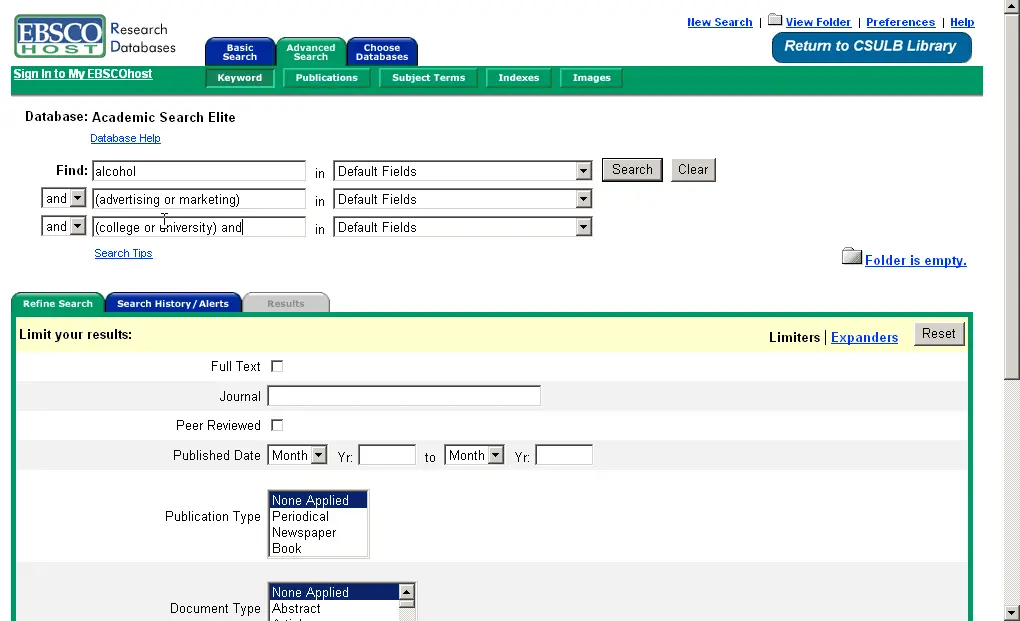
Use these steps with all databases to find articles: 1.) Enter your search statement using AND and OR. 2.) Click the Search button. 3.) Look at your results. Look at the article titles and read the abstracts. ALWAYS look at more than the first page of results. "In many databases, the results are listed by date (most current articles first) unlike search engines such as Google that list results by relevance. So the best citation may not be listed first!" View an example of searching for journal articles (requires flash). What if I get 0 results? Did you type in common words (such as if, the, a, of, in, is, it)? Did you spell all the words correctly? Check Dictionary.com Did you use AND and OR to connect your keywords? What if I get 5000+ results? WORKSHEET You will need to use Academic Search Elite to answer the next couple of questions, so keep the box open. Using Academic Search Elite find one citation to an article related to your topic. Copy and paste all of the citation information here. What subjects were listed in the record you found (see Mizael's citation)?
About BeeGames social
Playground and Play together are the BeeGames social layer — so you're never just playing alone.
What is a Playground?
Your Playground is your own personal game homepage. Pin the games you love, give it a name and a short bio, then make it public to share your personal arcade with anyone.
How do I use my Playground?
On any game page, tap “Playground” to pin that game. Head to My Playground to edit its name, bio and layout, then share your public link with friends.
What is Play together?
Play together lets you co-play the same game with friends in real time. Open a game room and everyone can play side by side while chatting in the room — like crowding around one screen, online.
How do I play with friends?
Tap “Play together” on a game page, pick a public room or a private one with a password, then share the room link with friends. You can also browse and join open rooms from the Lobby.