Rubik's Slide
Players
0
Rating
4.5★
Categories
Sliding
About
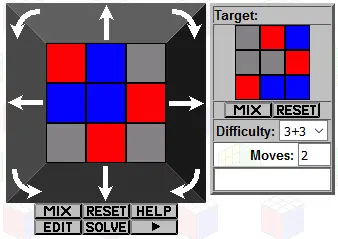
Rubik's Slide is an electronic puzzle played on a 3×3 grid of lights. The top part of the puzzle containing the grid of lights can be pushed left, right, up, or down, and this causes the pattern of lights to shift one step in that direction. Any lights on the furthest edge that would fall off the grid reappear on the opposite edge of the grid. The grid can also be rotated in either direction, and depending on the difficulty level, either causes the pattern to rotate by 90 degrees, or causes the eight outer lights to shift along cyclically. A random goal pattern is generated, and your aim is to reach that pattern from the starting pattern which is also randomly generated. Apart from the moving top section, there are three buttons. Symbol Meaning Explanation Equals Score Speaks the current score Tick Goal Displays the goal pattern Triangle Play Start play, or restart this level. The off switch on the back of the puzzle has two on-settings. In the middle setting (marked by the infinity symbol) you have free play, i.e. without time constraints. The rightmost setting (marked by a clock symbol) is the lightning round, where you play ten puzzles each with a time limit. There are three types of difficulty for the puzzles. 1. The twisting move does a quarter turn. One to four lights of one or two colours are used. 2. The twisting move cycles the 8 outer lights. Two to five lights of only one colour are used. 3. The twisting move cycles the 8 outer lights. Two to six lights of one or two colours are used. In free play mode, you only play one of these types of puzzle, as given by the difficulty setting. In lightning round mode all three types of puzzle occur, but the time limit you are given depends on both the difficulty of the particular puzzle and the overall difficulty setting. Selecting difficulty: When you switch on the puzzle it will show a little animation, and then you can select the difficulty level by pushing the grid up or down to light up one, two, or three rows. You can hear your best score by pressing the score button, or start play by pressing the Play button. You can re-select the difficulty level during play by holding down the Play and Score buttons simultaneously for a few seconds. Selecting volume: The volume setting can be accessed by holding down the Goal and Play buttons simultaneously for a few seconds. The volume setting can then be changed by turning the grid clockwise for louder, anti-clockwise for quieter. At the lowest setting the sound is switched off. To exit the volume display, just wait a few seconds without changing the volume level. Resetting: You can completely reset the puzzle so that it forgets all the scores by holding down the Score and Goal buttons simultaneously for a five seconds, and then also pressing the Play button at the same time. If your browser supports it, you can click on the link below to see a Javascript version of the Rubik's Slide. It does not do level 1 quarter turn puzzles, only the level 2/3 puzzles with 8-cycle moves.
Creator
Jaap Scherphuis
Game Studio
Category
Sliding
Type
Mini Game
Released
Recently
Players
0
More from Jaap Scherphuis
More Sliding games
You might also like
Trending games other players are loving right now.