Vegas Slots
Players
0
Rating
4.5★
Categories
Slot Machine
About
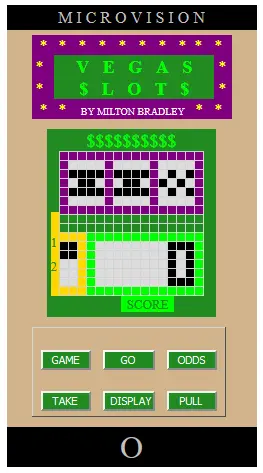
Simulator Notes This was a tough cartridge to simulate, because the instructions are fairly vague, and there's so much random chance involved in the game's operation. Here are some notes that I wrote up about the three game variations to give some insight on the simulation - some "inside" information that may help improve your game play. Although really, there's not much here to improve. Unless you're a gambling addict, this was probably the least entertaining of all the games released for the Microvision. I had more fun approaching it as a simulation exercise than I ever did playing the original. Game variation 1: Since I have no idea how the original game cartridge calculated the odds of each spin of the reels paying off, I just had to come up with something on my own. The way I coded it, when you press PULL the characters on the reels roll by in a cycle: bar, slash, checkerboard, circle (which seems to be the way the original game worked, as far as I could tell by watching it). If the Odds are set to "1", the leftmost reel will spin past a random number of characters, stopping after at least three, but no more than seven characters have gone by. This allows for an acceptable "spin time" and ensures that the reel has an equal chance of stopping on each of the four possible characters. After the first reel stops, the second will check each character as it goes by to see if it matches the first. If they match, the game generates a random number between 0 and 99. If that number is less than 40, the reel will stop (i.e. a 40% chance that the reels will match). If the character on reel two does not match reel one, it only has a 25% chance of stopping the reel. The third reel works the same way as the second, which should give decent odds of getting three of a kind. Slashes are no rarer than any other character, so the big 50 point payoff should come up every now and then. If you have the Odds set to "2", the first reel will still spin past a few characters, but then it will start checking to see what each character is as it appears. If it's a bar or a circle, it has a 30% chance of stopping the reel. If it's a checkerboard, it has a 25% chance, and if it's a slash it only has a 20% chance. The character showing on each reel has no bearing on where the next reel will stop. It should be fairly easy to occasionally hit low paying combinations (single bar, double bar, triple bars and circles), but fairly uncommon to hit triple checkerboards and very uncommon to hit the big payoff of triple slashes. Of course, it's all still based on luck and random chance. While testing, I would often find myself getting more winning spins on Odds setting 2 than on 1, both in the simulator and the original game. Game variation 2: The original cartridge didn't allow you to choose the "odds" for game 2, and the instructions don't specify how odds are calculated, so I initally coded it with the reels independent of each other, and each character having an equal chance of showing up in each window. But the bar character seemed to appear a lot that way (with a 25% chance of showing up in each window and three windows to appear in, the odds were good that at least one bar would show up each turn). This caused the game to take forever, because each player's turn was usually over after just one or two spins, and getting pairs and three of a kind was rare. So I adjusted the percentages so that slash, checkerboard and circle characters are about twice more likely to come up than the bar is. That seems to make for a playable game. The instructions are also vague as to whether the bar(s) can show up in any window, or if it has to be the leftmost window(s). From playing the actual cartridge, I discovered that it's one bar in any window that ends the turn, and two bars in any two windows that sets current winnings to zero. Also, if you get one bar and the other two (non-bar) windows match, you still don't get 2 points. On the other hand, two non-bar characters in any two windows are worth 2 points, which is nice. Game Variation 3 For game variation 3, the reels are coded to spin independently and each reel has an equal chance of stopping on any of the four characters. For the first reel, a random number is picked between 3 and 7 (inclusive) and the reel spins by that many characters before stopping. Once the first reel is stopped, the second reel picks a number between 0 and 99 for each character that comes up, and if that number is less then 25 the reel stops. The third reel works the same as the second, once the second reel stops. The "covered" middle reel really is spinning, even though the game is programmed to keep all the "pixels" in that window black until the player decides whether to uncover it or not. The game isn't "cheating" and picking a character for the middle window after the other reels have stopped. As vague as the instructions were for games 1 and 2, those for game 3 are even less enlightening. While trying to program the simulation, I kept coming up with questions that the instructions didn't answer. After going back and playing the original cartridge for a while, here are some points that the instructions don't mention or aren't fully clear about: Both players' pots start at 100. Since every press of PULL knocks a point off your pot, it's theoretically possible to get down to zero. I coded the simulator to keep playing in that situation, and just not charge a point for a PULL if the player' score is zero. I don't know if that's the way the original game worked, because it's practically impossible to get to zero. A point is deducted from your pot every time you press PULL, including the start of your turn. So if you choose to uncover the middle window, you're actually deducting 2 points from your pot before any winnings are added. Unlike game 1, getting a winning spin does not "waive" the point deduction of PULL. In the original game, if you pressed TAKE after the initial spin, the middle window was not uncovered. You never got to see whether you would have gotten more or less points if you had pressed PULL again. I thought that was kind of lame, so the simulator uncovers the window and shows you what you passed up. It doesn't affect your score at all. This is the only deliberate difference between the original and the simulation. Both players get the same number of turns before the game checks for a winner, like in game 2. If player 1 goes over 200, player 2 still gets a final turn, even if he or she is more than 10 points behind and can't possibly catch up. The winning score is shown when you press GO after player 2's turn, when one (or both) players are over 200 points and the scores are not tied. Pressing DISPLAY will show the losing player's score. Pressing GO again returns to the "choose game" screen. Your winnings for each turn are not added to your pot until you press TAKE. When that button is pressed, the score shown for the turn will return to zero, but pressing DISPLAY will show the current player's total pot so far. Pressing GO starts the next player's turn. If a player presses PULL twice (to uncover the middle window) and forgets to press TAKE before pressing GO, their winnings are automatically added to their pot before the next player's turn begins.
Creator
Bob Eichler
Game Studio
Category
Slot Machine
Type
Mini Game
Released
Recently
Players
0
More from Bob Eichler
More Slot Machine games
You might also like
Trending games other players are loving right now.