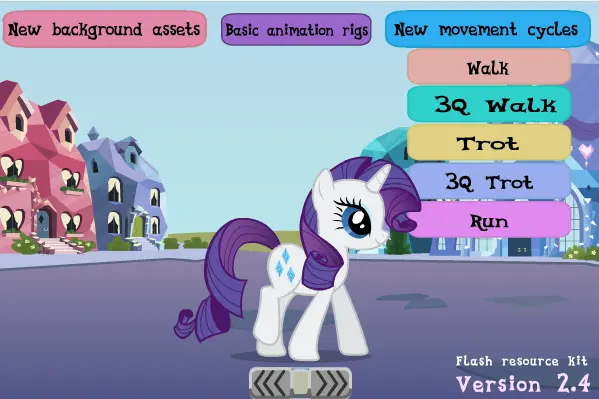
My Little Pony: Flash resource kit
MLP: Animator's Kit
ਖਿਲਾੜੀ
9
ਰੇਟਿਂਗ
4.5★
ਸ਼੍ਰੇਣਿਯਾਂ
Demonstration
ਕੇ ਬਾਰੇ ਮੇਂ
NEW IN 2.4 - Trotting animations (trot cycles) - Running animations (run cycles) -- only for Pinkie Pie and Rainbow Dash - Three quarters (3Q) walking and trotting animations - Improved walk cycles and all animation cycles, organized into folders and layers for animating, and reduced symbols - Basic puppet rigs for the mane6 and other ponies - Blinking animations - Lots of new background vectors and props from the show, including Crystal Empire - Expanded set of mouth shapes for lip syncing This is just an interactive demonstration using the animations in the flash resource kit, which can be downloaded below for the animation program Flash. THE FLASH FILES: Macromedia Flash8 version: HERE Adobe CS5 version: HERE This is intended to help people build their own animations. Either as a reference, or using the assets, it should be helpful to see how animations in the show were made. For example, you can break down Rainbow Dash running frame by frame, and see how she was animated. Use the animation clip, copy it, or just reference it for your art or animation. - and you don't even have to credit me if you don't want to! =D The Double Rainboom team created excellent animation puppets, which were taken down. The Double Rainboom assets can be downloaded HERE: (thanks to Electro-BLITZ for the files) --------------------- Old animations clips can be found in previous versions of my animation kit. Previous version(2.3) Previous version(2.1 / 2.2) ~My Little Pony: Friendship is Magic is property of Hasbro. I claim no ownership of anything here.
ਕ੍ਰਿਏਟਰ
Drud14
ਗੇਮ ਸ੍ਟੂਡਿਯੋ
ਸ਼੍ਰੇਣੀ
Demonstration
ਪ੍ਰਕਾਰ
ਮਿਨੀ ਗੇਮ
ਰਿਲੀਜ਼
ਹਾਲ ਹੀ ਮੇਂ
ਖਿਲਾੜੀ
9
Drud14 ਨਾਲ ਔਰ
ਔਰ Demonstration ਗੇਮ
ਤੁਹਾਨੂੰ ਇਹ ਵੀ ਪਸਂਦ ਆ ਸਕਤਾ ਹੈ
ਟ੍ਰੇਂਡਿਂਗ ਗੇਮ ਜੋ ਅਨ੍ਯ ਖਿਲਾੜੀ ਹੁਣ ਪਸਂਦ ਕਰ ਰਹੇ ਹੈਂ।