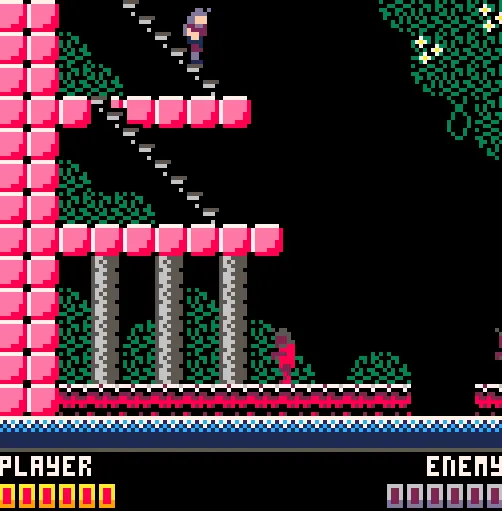
Demon Castle
کھلاڑی
1
ریٹنگ
—
زمرے
Metroidvania
بارے میں
Demon Castle is a Castlevania-style game for PICO-8 Story An evil sorcerer is trying to summon an ancient demon into the world. You are the only one who can travel to the sorcerer’s castle and prevent him from completing the summoning. Best of luck. Controls At the title screen, use the arrow keys to select your difficulty, then press the Z or X key to start the game. Use the arrow keys to move, and press up or down to start climbing stairs. Use the Z key to jump and the X key to attack with your whip. If you prefer, you can use the C and X keys instead of Z and X. Items Heart Crystal When you defeat a level boss, it will leave this behind. Collecting it will increase your maximum health, and end the level. Chicken This secret snack can be found hidden in secret walls throughout the game. If you’re lucky enough to find some, your health will be fully restored. Crypt Key This old key has been lost for centuries. Where could it be now, and what could it unlock? Stone of Sealing If you are unable to stop the sorcerer, these stones will be your best chance to reverse the summoning. You should try to find as many as you can. About Hard Difficulty At the title screen, you are given the option to pick either Normal or Hard difficulty. When playing on Hard, you will start the game with less life than on Normal. You will also encounter more enemies in more difficult locations. Finally, when playing on Hard, you will not be given checkpoints throughout a level, so you will need to start the level from the beginning if you lose all your life. Tips and Advice Sometimes, after you beat a level, you will be given a choice of which way to go next. There are multiple paths through the game, and you can see the path you’ve taken so far on the map. There is no “correct” path through the game, and the game can be fully completed using any path on either difficulty. Be observant. Investigate suspicious-looking areas for hidden items, and more. About the Code Due to the size of this game, it was necessary to reduce the size of the code before the game could be released. I used the picotool library to reduce the size of the code, at the cost of readability. However, the original code, before being reduced, can be found on GitHub, here.
گیم تبصرے
ابھی کوئی پیغامات نہیں۔ گفتگو شروع کریں۔
تخلیق کار
Mush101
گیم اسٹوڈیو
زمرہ
Metroidvania
قسم
منی گیم
جاری کیا گیا
حال ہی میں
کھلاڑی
1